Using Copilot to Create a Fiscal Year-End "Greatest Hits" Album
AI Adoption • Executive Communications • Creative Direction • Employee Engagement
Every fiscal year-end, leaders face the same challenge: recognize accomplishments across dozens of teams while making a recap presentation people actually want to pay attention to. With limited time to gather updates and final business results arriving just before publication, I needed a creative way to celebrate the organization's work without waiting for every data point to be finalized.
Finding the Story
Rather than building another slide deck filled with charts and bullet points, I looked for a theme that would connect every team while leaving room for late-breaking updates.
Using Microsoft Copilot, I analyzed quarterly accomplishments and product milestones, asking it to suggest songs that reflected each team's contributions. I evaluated the recommendations, selected the strongest matches, and wrote custom descriptions explaining why each song represented that team's work. The music became a storytelling device rather than the story itself.
Designing the Experience
The presentation extended beyond PowerPoint.
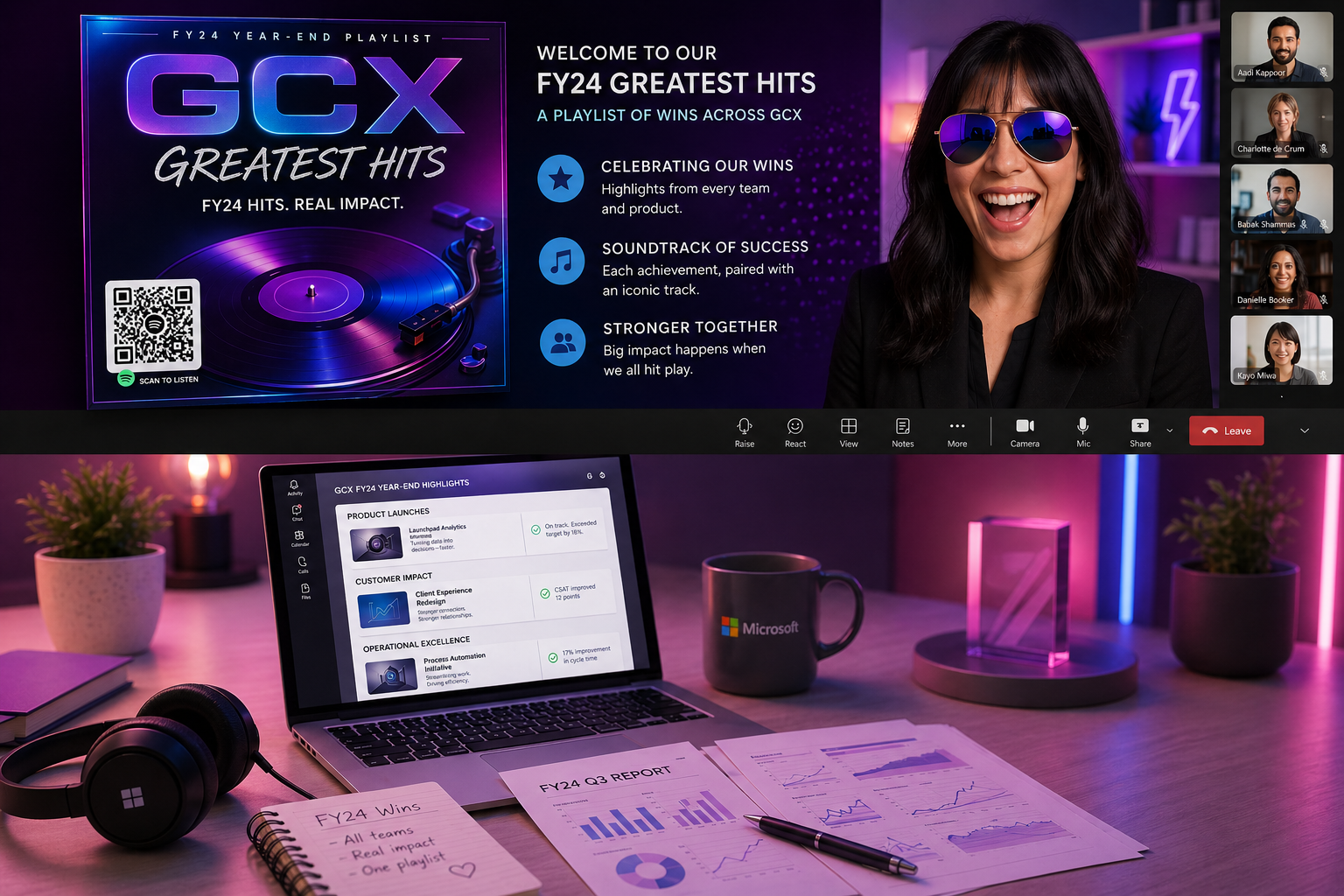
Working with our design team, I developed custom album artwork for each leadership team, created an organization-wide Spotify playlist, and added a QR code so employees could listen during the meeting. Each leadership team received its own "album," creating anticipation as leaders revealed both their accomplishments and their team's soundtrack.
Songs like Don't Stop Believin', Roar, and You Can Make It If You Try celebrated perseverance, collaboration, innovation, and growth while bringing personality to what could have been a routine business review.
Results
The presentation transformed a traditional fiscal year-end recap into a memorable employee experience. Leaders enthusiastically embraced the theme, even arriving to the meeting in rock-star attire to reveal their teams' songs. Employees joined the Teams meeting curious about the presentation, then stayed engaged as each leadership team shared accomplishments through music and storytelling.
Beyond celebrating organizational wins, the project demonstrated how AI can accelerate creative ideation while leaving strategic decisions, storytelling, and audience engagement firmly in human hands.
Thinking One Meeting Ahead
While collecting leadership highlights, I also asked each executive for a short thank-you message to their teams and their favorite moments from the fiscal year.
That additional content wasn't needed for the "Greatest Hits" presentation, but I knew our next organization-wide meeting would kick off the new fiscal year. By gathering both sets of information at the same time, I created the foundation for a completely different presentation without requiring leaders to revisit the same request.
That content ultimately became a high school yearbook-themed multimedia recap featuring videos, team photos, employee quotes, and an interactive SharePoint experience.
What I Learned
Copilot didn't create the presentation. It expanded the range of creative ideas I could explore.
The value wasn't in asking AI to do the work for me. It was in using AI as a brainstorming partner, then applying judgment, context, humor, and organizational knowledge to create something that felt authentic to our culture.
Sometimes the best use of AI isn't replacing creativity. It's giving creativity a better place to start.
GCX Greatest Hits: Sample Playlist
1. “Don’t Stop Believin’” — Journey
A classic anthem for teams that pushed through ambiguity and delivered big results.
2. “Roar” — Katy Perry
Perfect for a team that found its voice, influenced stakeholders, or drove a major launch.
3. “You Can Make It If You Try” — Gene Allison
A nod to perseverance, especially for teams that overcame blockers or tight timelines.
4. “Stronger” — Kelly Clarkson
For a team that rebuilt processes, improved performance, or came back from a tough quarter.
5. “Good as Hell” — Lizzo
Celebrates teams that boosted morale, culture, or employee experience.
6. “On Top of the World” — Imagine Dragons
A great fit for teams that hit major milestones or exceeded targets.
7. “Ain’t No Mountain High Enough” — Marvin Gaye & Tammi Terrell
For cross‑collaboration wins or org‑wide partnerships.
8. “Unstoppable” — Sia
Ideal for high‑impact product teams or engineering groups that delivered at scale.
9. “We Are Family” — Sister Sledge
A fun pick for community‑building, onboarding, or people‑focused initiatives.
10. “Hall of Fame” — The Script feat. will.i.am
A strong closer for leadership presentations or end‑of‑year recognition moments.
Instructions | Use Copilot to Create your own Greatest Hits Album
-
1. Gather your “raw material”
Collect recent reports: Use quarterly reports, dashboards, and status updates from the past 6–12 months.
List key achievements: Capture major launches, milestones, customer wins, process improvements, and culture moments.
Group by team or theme: Decide whether each “album” represents a team, a product, a region, or a workstream.
2. Bring your data into Copilot
Open Copilot in your preferred app: Word, PowerPoint, Excel, or Copilot in Teams all work well.
Provide context in your prompt: Tell Copilot who the audience is, what the time period is, and that you want to create a “Greatest Hits” style recap.
Attach or reference your content: Point Copilot to your reports, notes, or pasted summaries so it has something to work with.
Example prompt:
“You are helping me create a ‘Greatest Hits’ style recap of our fiscal year for the Global Customer Experience organization. Use the attached quarterly reports and notes to identify each team’s top achievements and product milestones. Summarize them in a way that is clear, celebratory, and ready to pair with songs.”
3. Ask Copilot to identify the “hits”
Have Copilot summarize wins by team:
“Summarize the top 3 to 5 achievements for each team in this time period.”
Refine for clarity and tone:
“Rewrite these achievements in a concise, celebratory tone suitable for a leadership presentation.”
Confirm coverage: Make sure every team or key stakeholder group is represented.
4. Turn achievements into song pairings
Set the vibe for the playlist: Decide if you want motivational, nostalgic, fun, or a mix.
Ask Copilot for song suggestions:
“For each team achievement, suggest a song that matches the mood or theme of the win. Include a short explanation of why you chose that song.”
Review and adjust: Swap out any songs that do not fit your culture, audience, or brand.
5. Build your “albums” and playlist
Create one “album” per team: Use a slide, page, or section that includes:
Team name
Top wins
Song titles and short explanations
Create an organization wide playlist: Combine all songs into a single list that represents the full year.
Ask Copilot for titles and themes:
“Give me 5 creative album titles for the Global Customer Experience team’s Greatest Hits recap.”
6. Design the album covers
Draft visual concepts with Copilot:
“Suggest visual concepts for album cover art that feel modern, inclusive, and aligned with a tech organization.”
Hand off to design partners or use templates: Turn those concepts into real cover art in PowerPoint, Designer, or your design tool of choice.
Align visuals with your story: Use colors, icons, and imagery that reflect your teams and their work.
7. Bring it to life in your meeting
Create the presentation flow:
Start with the organization wide “Greatest Hits”
Move into team specific albums
Reveal songs as leaders present their wins
Add a QR code to the playlist: Link to your Spotify or internal playlist so people can listen after the meeting.
Invite leaders to participate: Ask them to present their “track list” and share a quick story behind one song.
8. Capture momentum for the next project
Ask for highlights and thank you messages: While collecting wins, also ask leaders for their favorite moments and messages to their teams.
Store everything in one place: Use Copilot to summarize and organize these into themes you can reuse.
Spin up the next creative format: Turn those highlights into a yearbook, sizzle reel, or another storytelling format for the next fiscal year.
-
How to Use Copilot to Create Your Own Greatest Hits Album
A step by step guide for teachers, teams, clubs, and classrooms
1. Gather your material
Start with anything that captures the year:
Student papers or projects
Funny quotes or inside jokes
Photos or screenshots
Achievement lists
Classroom moments or milestones
Notes from events, games, or performances
You do not need everything to be perfect or organized. Copilot can help sort it out.
2. Bring your content into Copilot
Open Copilot in Word, PowerPoint, OneNote, or your browser.
Give Copilot a simple prompt like:
“Help me create a Greatest Hits album for my class. Use the notes and examples I provide to identify the top moments, achievements, and funny memories from this year.”
Paste in your material or upload the documents you want Copilot to use.
3. Ask Copilot to identify the “hits”
Have Copilot pull out the best moments:
Top achievements
Memorable quotes
Standout projects
Funny or heartwarming moments
Group accomplishments
Example prompt:
“Summarize the top 10 moments from this list in a fun, celebratory tone.”
4. Turn each moment into a song pairing
This is where the magic happens.
Tell Copilot the vibe you want:
Upbeat
Nostalgic
Inspirational
Silly
A mix
Then ask:
“Suggest a song that matches each moment and explain why it fits.”
You can keep Copilot’s suggestions or swap in your own favorites.
5. Build your album
Decide how you want to present it:
A slide deck
A printed booklet
A digital album
A poster
A class website
A simple one‑page summary
For each “track,” include:
The moment
The song
A short explanation
A photo or visual if you have one
6. Create your album cover
Ask Copilot for ideas:
“Give me creative album cover concepts for a classroom Greatest Hits album.”
Choose a style:
Retro vinyl
Pop album
Yearbook style
Bright and modern
Cartoon or collage
You can design it yourself or use templates in PowerPoint or Canva.
7. Share it with your group
You can:
Present it at a year end celebration
Print copies for students
Share a digital playlist
Add a QR code that links to the songs
Turn it into a slideshow for families
Use it as a memory keepsake
This is where the reactions happen. People love seeing their moments turned into “tracks.”
8. Use the momentum for your next project
If you want to build something else later, ask Copilot to help you collect:
Highlights
Reflections
Thank you messages
Favorite memories
Photos
You can turn those into:
A yearbook
A class video
A scrapbook
A “Best Of” reel
A digital time capsule
-
1. Collect your memories
Gather anything that represents your year or season:
Notes
Photos
Quotes
Projects
Funny moments
Achievements
Messages from people
Anything you want to remember
You do not need to organize it. Copilot can help with that part.
2. Bring your content into Copilot
Open Copilot in Word, PowerPoint, OneNote, or your browser.
Give it a simple instruction like:
“Help me create a Greatest Hits album using the memories and examples I share. Identify the top moments and summarize them in a fun, positive way.”
Paste in your material or upload the documents you want Copilot to use.
3. Ask Copilot to find the highlights
Have Copilot pull out the best moments from your content:
Big wins
Funny stories
Special memories
Standout projects
Group accomplishments
Example prompt:
“Summarize the top moments from this list in a clear and celebratory tone.”
4. Turn each moment into a song pairing
Tell Copilot the mood you want:
Fun
Nostalgic
Upbeat
Calm
Inspirational
Then ask:
“Suggest a song that matches each moment and explain why it fits.”
You can keep the suggestions or swap in your own favorites.
5. Build your album
Choose how you want to present it:
A slideshow
A printed page
A digital album
A poster
A simple document
A playlist with descriptions
For each “track,” include:
The moment
The song
A short explanation
A photo or visual if you have one
6. Create your album cover
Ask Copilot for ideas:
“Give me creative album cover concepts for a Greatest Hits album.”
Pick a style you like:
Retro
Modern
Colorful
Minimal
Playful
Elegant
You can design it yourself or use templates in your favorite tool.
7. Share it with your group
You can:
Present it at a celebration
Print copies
Share a digital playlist
Add a QR code
Send it to families or teammates
Use it as a keepsake
People love seeing their moments turned into “tracks.”
8. Save everything for next time
Ask Copilot to help you collect:
Highlights
Reflections
Messages
Photos
Quotes
You can turn these into:
A yearbook
A slideshow
A scrapbook
A “Best Of” reel
A digital memory page